Size:21.18 MB / Version:1.1 / MD5:34c6b2ff4d21b6bf29f16d1793db8fd5 / SHA1:e12cda775b8b8764e100eb7e6217b8ed7637ef20
A new way to reactivate your jailbreak, no certificate expiration issue
Once you jailbroke your device successfully and restart it, you need reactivate jailbreak again.
Now, you have a new way to reactivate jailbreak.
Visit
https://jbme.qwertyoruiop.com/ on safari from your device, click "go" and follow guide to reactivate jailbreak.
Preparation:
1. Pangu jailbreak IPA file NvwaStone_1.1.ipa available at http://pangu.io .
2. Cydia impactor available at
http://www.cydiaimpactor.com/ .
3. A computer (Cydia impactor runs on all major OSes, including Windows, OS X, and Linux)
4. A valid Apple ID. (In case that
you do not want to use your current Apple ID to apply the personal
certificate for any reason, we suggest you apply a new Apple ID and use
it)
Option “Use embedded certificate effective until April 2017"
If you chose
the option "Use embedded certificate effective until April 2017", Pangu 9
will install an app that is signed by a revoked certificate. Before
April 2017, you will not need reinstall Pangu jailbreak app.
If you want to sign the app with your own certificate, do not select this option.
Limitations:
1. An Apple ID can only apply for a certificate for a limited number of devices.
2. The certificate will expire in 7
days. If your certificate gets expired, you need to follow the guide to
install the jailbreak IPA again.
To Apple Developers:
If you
have enrolled the Apple developer membership, signing the IPA file with
your own developer certification is a better choice (i.e., Pangu
jailbreak app will get expired in 1 year, rather than 7 days).
Jailbreak guide:
1. Unzip the Cydia impactor file and run it.
2. Connect your iOS device to your computer and trust the computer on your iOS device.
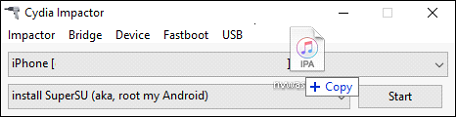
3. Drag NvwaStone_1.0.ipa into Cydia impactor app.
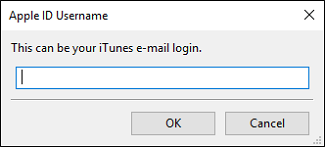
4. Input you email address( it’s your apple id)
5. Input your apple ID password.
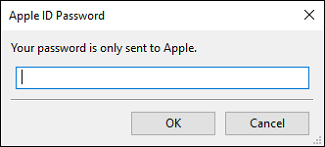
6. Click OK button to continue.
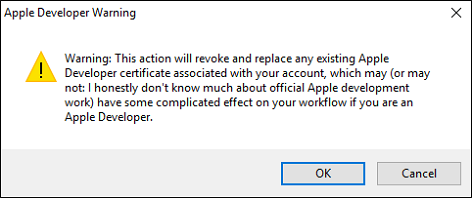
7. Cydia impactor will automatically
prepare everything based on your inputs and sign the IPA file. If
everything is OK, the IPA file should be installed in your iOS device
correctly. If you get error notifications, you probably input incorrect
Apple ID or password.
8. On your device, Tap Settings
> General > Device Management. You then see a profile for the
developer under your “apple ID” heading. Tap the profile to establish
trust for this developer. (An Internet connection is required to verify
the app developer's certificate when establishing trust.)
9. On your device, find Pangu App and run it.
10. Click the "start" button to jailbreak your device.